Quick summary
Referrals lets you invite people to Klik VIP using your personal referral link, track referral activity and commissions, and request a withdrawal once the minimum approved commission amount is reached.
What are Referrals?
The Referrals page gives you a personal referral URL that you can use when inviting new users to Klik VIP. It also shows your referral activity and commission status.
Referrals
The number of users recorded as referrals.
Paying referrals
The number of referred users recorded as paying referrals.
Pending commissions
Commission amounts that are still waiting for approval.
Approved commissions
Commission amounts that have already been approved.
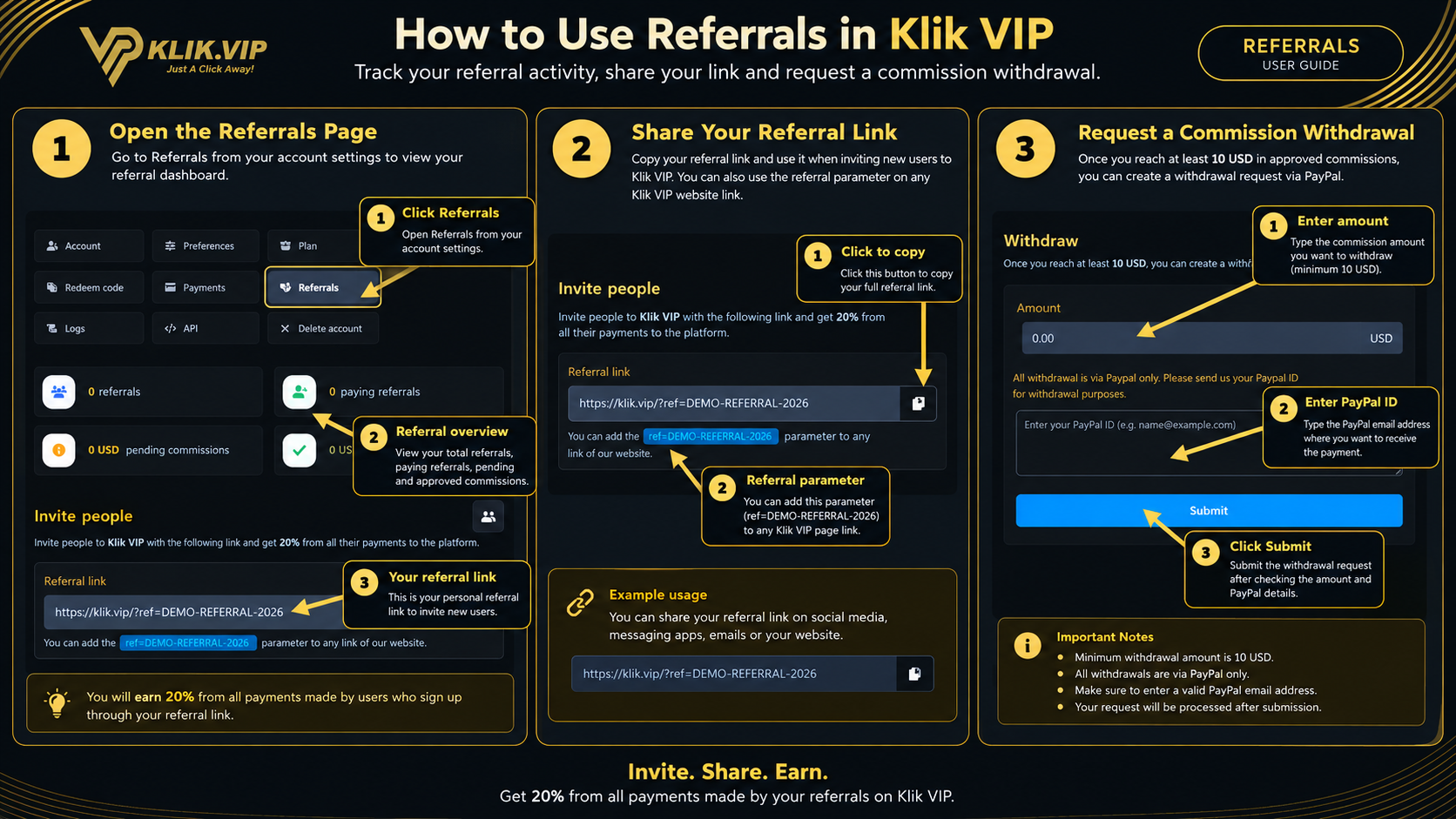
Click or tap the image to view full size.
1. Open the Referrals Page
Open Referrals from your account settings to access the referral dashboard.
The summary cards at the top of the page show:
- Referrals
- Paying referrals
- Pending commissions
- Approved commissions
Your referral percentage depends on your current Klik VIP plan or account configuration. The example shown in this guide displays a 20% referral reward.
3. Request a Commission Withdrawal
The Withdraw section is used to request a payout after you meet the minimum requirement shown on the page.
The current Referrals screen states:
- You need at least 10 USD before you can create a withdrawal request.
- Withdrawals are currently made via PayPal only.
- You need to provide your PayPal ID for withdrawal purposes.
To submit the request:
- Enter the withdrawal amount.
- Enter your PayPal ID.
- Review the details carefully.
- Click Submit.
Important: the minimum amount, payment method and referral percentage in this guide reflect the current Klik VIP Referrals screen. Always check the live page before submitting a withdrawal request.
4. Tips & Good Practice
- Copy the referral link directly from Klik VIP rather than typing it manually.
- Use the full referral link when sharing Klik VIP with new users.
- Check pending and approved commissions separately.
- Wait until the minimum withdrawal requirement is met before submitting a request.
- Confirm your PayPal ID carefully before submitting a withdrawal request.
- Avoid publicly sharing screenshots containing your real referral parameter if you do not want others to reuse it.
Recommended flow: open Referrals → copy your referral link → share it → monitor referrals and commissions → request a withdrawal once eligible.